Best Mechanical Keyboards for Coders and Gamers
The right mechanical keyboard depends on layout, switch feel, noise tolerance and connectivity. A compact board can free desk space, while a full-size model retains a number pad for spreadsheets and office work.
By Smart Shopping Deals Editorial Team · Published 7 October 2026 · Reviewed 21 October 2026
This guide helps office users, programmers and gamers choose a keyboard by layout and switch behaviour instead of treating lighting or discount percentage as the main specification.
How to choose
- Choose linear switches for smooth presses, tactile switches for feedback or clicky switches only when noise is acceptable.
- Check whether the layout includes the navigation keys and number pad you actually use.
- For wireless models, compare Bluetooth, receiver support, wired mode and battery information.
- Look for replaceable keycaps, dependable stabilisers and software support if remapping matters.
What to avoid
Do not assume every mechanical keyboard is hot-swappable or that every keycap set fits. Confirm switch compatibility, layout and operating-system support.
Choose the layout before the switch
A 60% board saves space but removes dedicated function, navigation and arrow keys. Tenkeyless keeps those navigation keys while dropping the number pad; a full-size layout remains practical for frequent numeric entry. Check the photographed layout carefully because key placement, Enter key shape and secondary legends can vary between listings.
Switch feel, sound and repairability
Linear switches move smoothly, tactile switches add a bump and clicky switches add both feedback and noise. Office environments often favour quieter linear or tactile options. Hot-swap support can make repairs and experimentation easier, but socket compatibility varies; “mechanical” alone does not mean switches can be removed without soldering.
Connectivity and software trade-offs
For wireless use, confirm whether the model supports Bluetooth, a 2.4 GHz receiver and wired mode, and whether switching between devices is convenient. Software-based remapping may require Windows even when basic typing works elsewhere. Look for onboard memory if custom keys or lighting must persist without an application running.
Current products worth comparing
These are current catalogue results matching the guide, not hands-on endorsements. Verify the exact model, seller, delivery, warranty and final checkout price.

Ant Esports Scorpion MK20 Wired 75% Mechanical Gaming Keyboard, 87 Keys Compact TKL Wired Linear Red Switches Detachable USB RGB Backlight Keyboard
₹999.00
Save ₹4,000 · 80% off
Price checked 29 Oct 2026, 11:26 AM IST

AULA F75 75% Wireless PBT Keycaps Mechanical Keyboard | Hot Swappable, Pre-lubed Linear Switches | RGB Backlit, 2.4GHz/Type-C/Bluetooth Gaming Keyboard (Thunder Black, Star-Vector(Seiya) Switch)
₹4,686.00
Save ₹11,313 · 71% off
Price checked 29 Oct 2026, 11:26 AM IST

Acer Nitro X Wired Mechanical Gaming Keyboard | 61 Keys | Red Switches | 17-Mode Rainbow Backlight | 20M Keystroke Life | 22-Key Anti-Ghosting | Double Injection Keycaps | Compact 60% Layout
₹988.00
Save ₹2,011 · 67% off
Price checked 29 Oct 2026, 11:26 AM IST
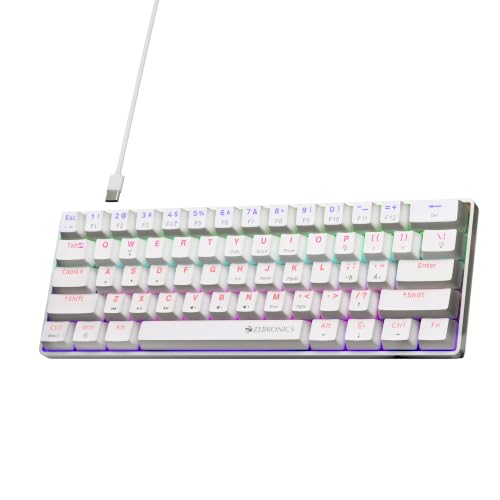
Zebronics Mechanical Keyboard, Silent Linear Red Switches, 61 Keys Layout, 26 Key Anti Ghosting, Double Shot Keycaps, 17 LED Modes, Media Controls, 1.5m Cable (Max Ninja 61, White)
₹1,199.00
Save ₹1,400 · 54% off
Price checked 29 Oct 2026, 11:26 AM IST
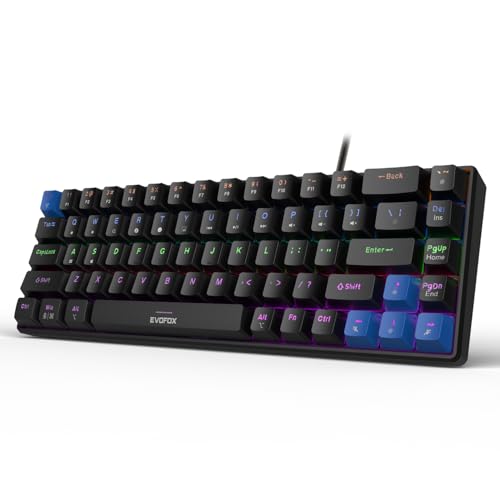
EvoFox Katana S Mini Wired Mechanical Keyboard | Hot-Swappable Silent Red Switches | 68-Key Compact Layout | Vivid Rainbow Backlighting | 1000Hz Polling Rate, All Keys Anti-Ghosting (Black)
₹1,479.00
Save ₹1,520 · 51% off
Price checked 29 Oct 2026, 11:26 AM IST

EvoFox Katana X2 TKL Mechanical Gaming Keyboard | 3‑Pin Replaceable Clicky Blue Switches, Dynamic Backlighting, All Keys Anti‑Ghosting, Volume Knob, Copilot, Xbox Gamebar, Screenshot & More (Black)
₹1,689.00
Save ₹1,610 · 49% off
Price checked 29 Oct 2026, 11:26 AM IST
Frequently asked questions
Are mechanical keyboards always better for coding?
No. Layout, comfort, noise and reliability matter more than the switch technology alone.
What is hot-swappable?
It means compatible switches can be removed without soldering, but you must still confirm the supported switch-pin format.
Is wireless suitable for gaming?
A good receiver mode can be responsive, but check the connection type, polling information and whether wired operation is available.
Final buying check
Use this guide to create a shortlist, then confirm specifications on the retailer page. A crossed-out price does not by itself prove value, and availability can change quickly.
This guide explains a comparison method; it does not claim hands-on testing. Read how we select and explain deals.